
 ™
™Account for every mile.
See distance by vehicle and driver, with business, personal, commuting, and unclassified mileage kept visible.
Output: mileage coverage reportGive the owner, operations, and finance one traceable view of mileage coverage, fuel spend, supported MPG, and the exceptions that still need a decision.
Free beta for 25 US field-service fleets
No card. No subscription. One short feedback email.
 Illustrative SFP digital avatar
The skill gives your AI a focused operating role. It knows which files to ask for, how to connect them, what the evidence can support, and when a person must decide.
Instead of asking an owner to compare five exports by hand, the skill organizes the evidence around the questions that move a weekly fleet review forward.
See distance by vehicle and driver, with business, personal, commuting, and unclassified mileage kept visible.
Output: mileage coverage reportMatch fuel-card activity to vehicles, trips, work events, and finance records without hiding reversals or unmatched items.
Output: fuel and finance reconciliationKeep full-to-full tank-cycle MPG separate from approximate period MPG so the number carries its evidence limits.
Output: supported MPG cycle registerRoute missing tank boundaries, identity gaps, odometer issues, and unmatched purchases to a named human reviewer.
Output: prioritized review queueEach role works from the same saved evidence and passes its result to the next. The owner gets one coordinated report instead of four disconnected analyses.
 Illustrative SFP agent crew
Normalizes odometers, trip distance, vehicles, drivers, and proposed business-use classifications without hiding gaps.
Hands back: driver and vehicle mileage coverageConnects gas-card purchases, reversals, units, vehicles, trips, and finance records while preserving unmatched activity.
Hands back: fuel reconciliation and supported MPGUses jobs, work orders, timing, and dispatch context to help a reviewer understand why fleet movement occurred.
Hands back: work-event evidence and context gapsPrioritizes missing tank boundaries, identity conflicts, odometer issues, and unsupported conclusions for a named person.
Hands back: an owned exception and decision queueEvery value below comes from the skill's bundled fixtures. Each panel is labeled synthetic and keeps the distinction between supported tank-cycle MPG and approximate period MPG.
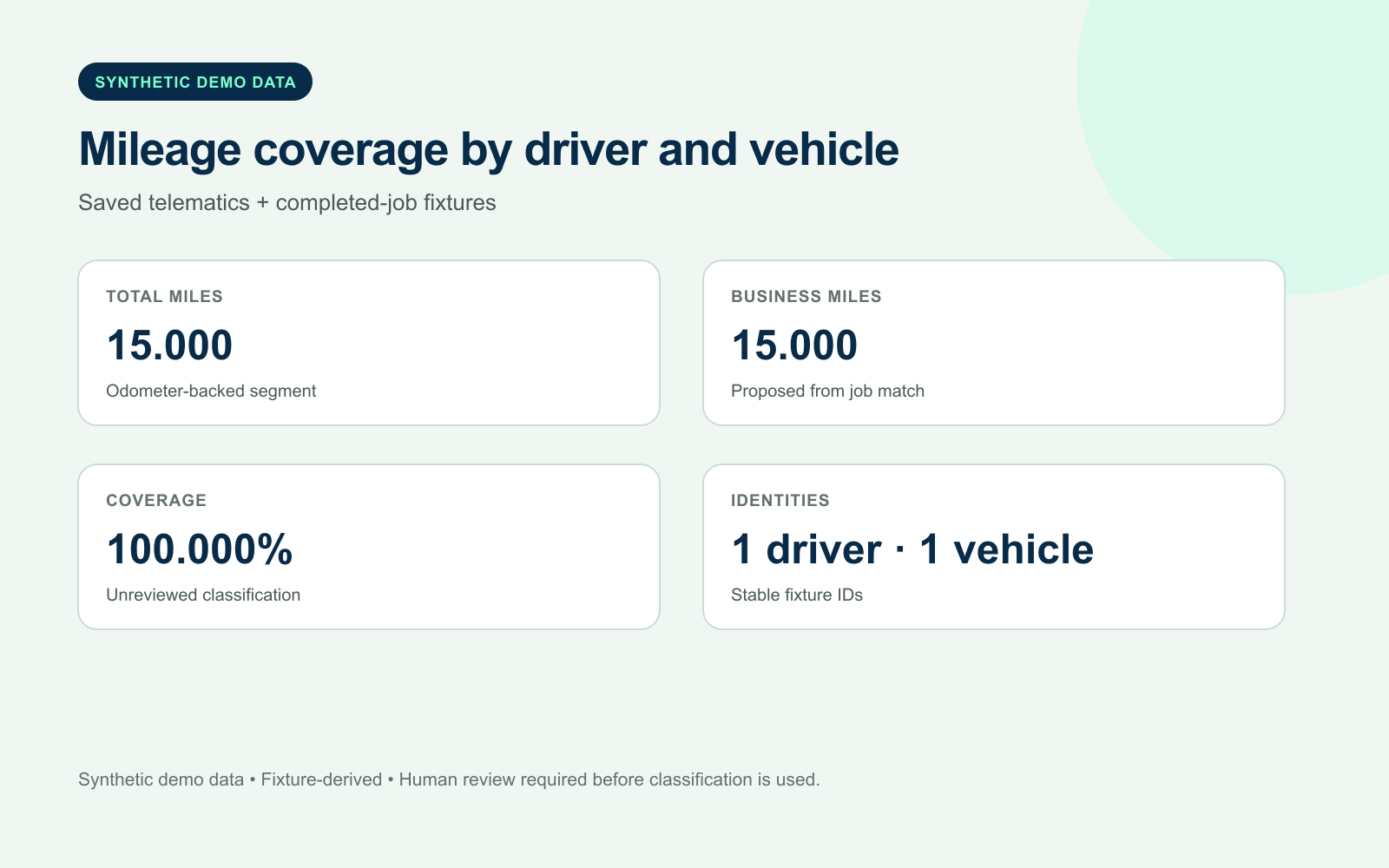 Coverage output
15.000 fixture miles, one matched driver and vehicle, and 100.000% proposed classification coverage—still unreviewed.
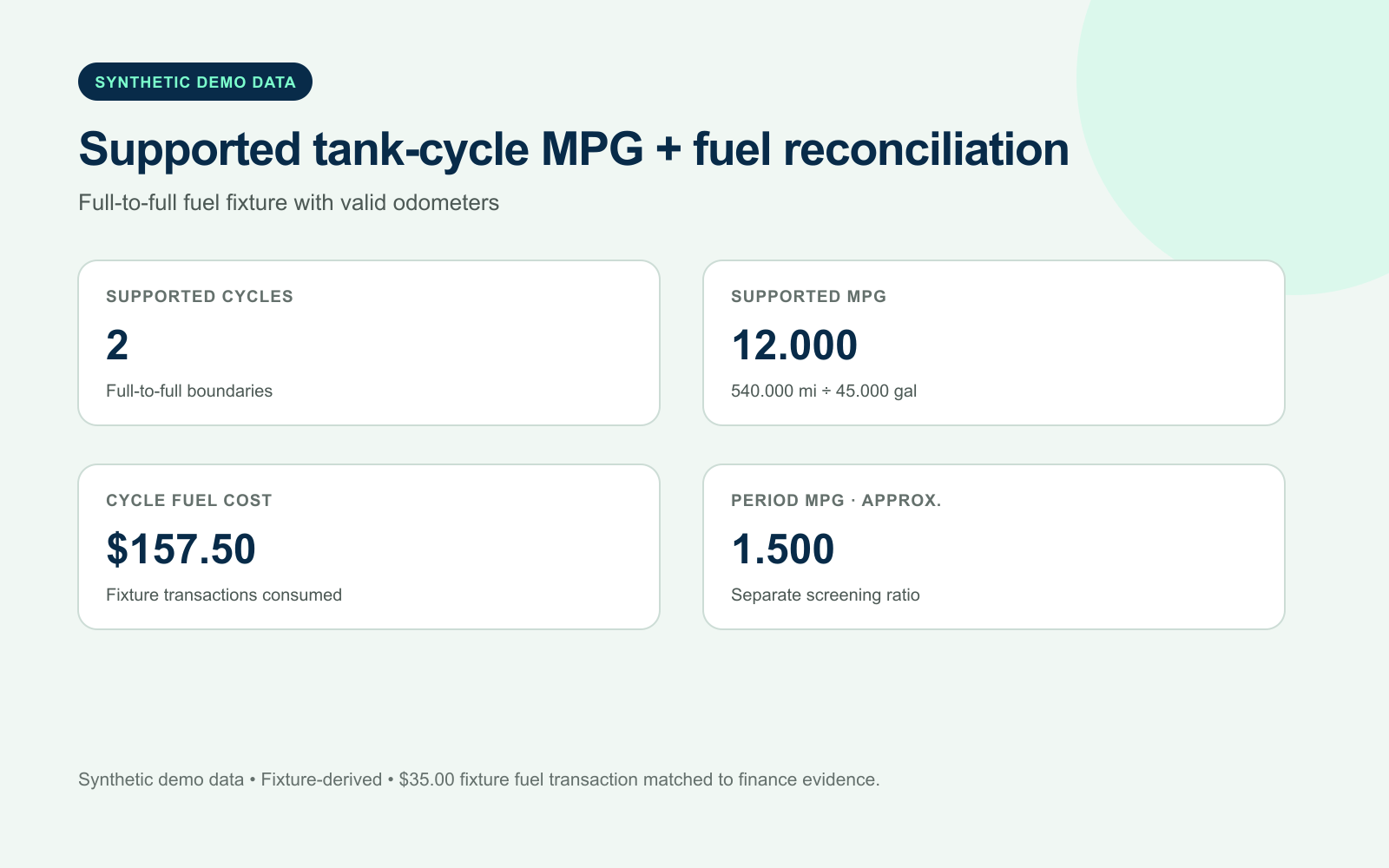 Fuel + MPG output
Two full-to-full fixture cycles support 12.000 weighted MPG. The separate period estimate is 1.500 MPG and is not presented as tank-cycle evidence.
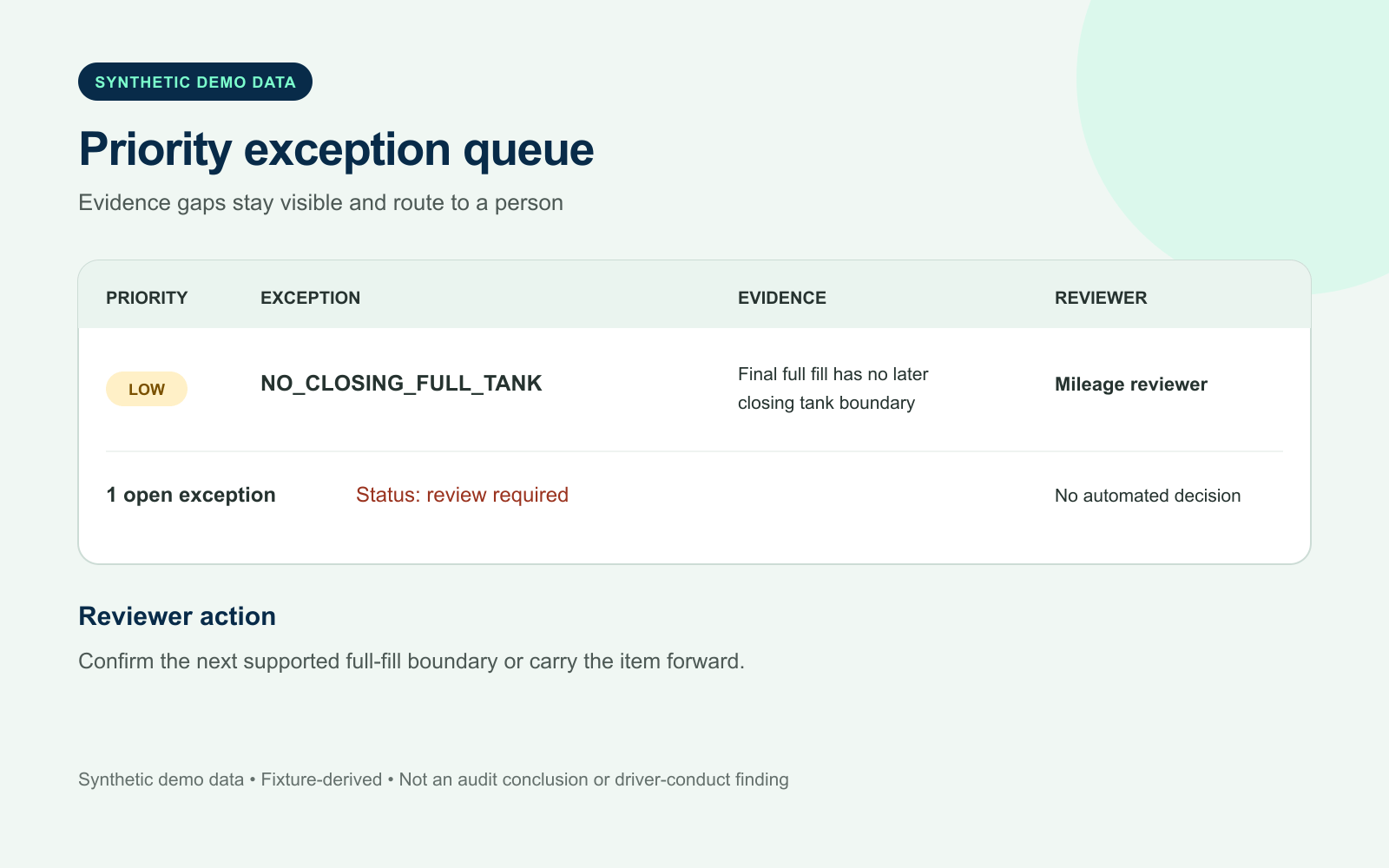 Action output
A missing closing full-tank boundary stays in review. The agent flags evidence gaps; a named person decides what they mean.
This skill carries a reusable intelligence layer for manage fleet mileage and fuel: focused context, workflow-fit personalization, evidence-led research, expert acceptance checks, and a defensible record of the work it helped remove.
A local context tool turns scope, rules, sources, prior decisions, and conflicts into a compact brief the next run can reuse.
Less repeated prompting and source huntingWorkflow-specific guidance defines strong sources, freshness, quality checks, expertise boundaries, and when research can stop.
More focused analysis with traceable evidenceA comparison tool records minutes, manual steps, tokens, source opens, rework, and completed outputs against a comparable baseline.
Measured or clearly labeled as estimatedWorkflow-specific questions capture systems, terminology, policies, thresholds, owners, and operating constraints. Critical gaps hold only the outputs they affect.
Draft, review, and operational readinessEach output carries anticipated expert concerns, evidence requirements, pass conditions, hold conditions, and a controlled revision path.
Actual reviewer feedback stays separately attributedThe local work pack gives the owner a management summary while preserving the detailed evidence fleet, operations, and finance need to review it.
Use when a service or fleet company needs mileage reporting, gas-card reconciliation, business-purpose review, fuel-economy analysis, or a management-ready audit trail.
Coverage, supported MPG, fuel reconciliation, and open exceptions in one management view.
Seventeen standard-library Python entry points help intake, normalize, reconcile, verify, analyze, report, personalize, manage expert review, check research, and measure work.
Normalized rows retain source lineage while unsupported conclusions stay visibly blocked.
Classification, driver-conduct, tax, accounting, and operating decisions remain with your reviewers.
The skill works from copies of the files you already control. It does not log into, change, or send data back to provider systems.
Bring read-only copies from telematics, gas cards, dispatch, mileage logs, and finance.
The agent maps identities, normalizes units, joins evidence, calculates supported metrics, and preserves gaps.
Owner, fleet, operations, or finance reviews exceptions before the report is relied on.
“I want one mileage and fuel report from my trip, gas-card, job, and money files.”
The skill will ask for the next fact or file. You do not need to know a special command.
Choose up to 20 business jobs. We make each skill fit the same business. Your team can use the pack again and again.
Yes. You can make and download one beta skill per email. No card or plan is needed. We ask to send one feedback email after you try it.
Start with mileage logs or saved telematics exports, fuel-card, dispatch, and finance exports, vehicle and driver mappings, reporting period, mileage policy, and reviewers. Use copies of your files and remove private information you do not need for the job.
The skill works from local copies and saved read-only exports. It never changes Samsara, gas-card, dispatch, payroll, or accounting systems. A qualified person reviews business purpose, reimbursement, tax, payroll, privacy, fraud, safety, and driver decisions.
It builds a reusable context brief, loads detailed evidence only when a stage needs it, checks the operating context for this workflow, audits research sources, and compares a like-for-like baseline with the assisted run. Token counts are planning estimates unless provider usage is supplied, and no savings are guaranteed.
Each skill has workflow-specific questions for systems, policies, owners, thresholds, terminology, and operating constraints. It reports which outputs are ready, partial, or blocked, then provides anticipated practitioner concerns and acceptance tests. Those concerns are a review rubric—not customer feedback or an endorsement—and actual reviewer comments stay separately attributed.
A ZIP is a way to send the agent skill in one file. Opening it does not install or run anything. An optional helper tool runs only when you choose to run it.
The Personalized AI Skill Pack gives you up to 20 agent skills for the same business. It is free during beta, with a planned $49 price after beta.